Top Poster v1.0.7
- Seller MojoRisin
- Creation date
Sidebar widget showing your top posters.

Overview Copyright info Releases (1)
Free For Customers
Blatchy Top Posters
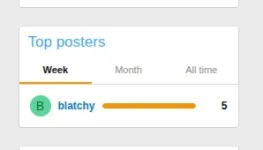
A modern, performance-friendly top posters widget for your XenForo 2.3 sidebar. Switch between weekly, monthly, and all-time leaders with a single click — visualized with proportional bars so members can see exactly who's dominating the conversation.
Features
Installation
Configuration
Compatibility
Support
Visit overallowed.com for support and to see the rest of the Blatchy / Over Allowed addon catalog.
Blatchy Top Posters
A modern, performance-friendly top posters widget for your XenForo 2.3 sidebar. Switch between weekly, monthly, and all-time leaders with a single click — visualized with proportional bars so members can see exactly who's dominating the conversation.
Features
- Three timeframes — Week, Month, and All time, switchable via tabs
- Bar visualization — each user's bar scales relative to the leader, making rankings instantly visible
- Leader highlight — top poster's bar uses your style's accent color; others stay subtle
- Configurable count — show anywhere from 3 to 50 users per timeframe
- Selectable tabs — display only the timeframes you want; pick your default
- Permission-aware — automatically excludes banned, invisible, and unconfirmed users
- Daily cron rebuild — counts are refreshed once a day at midnight, not on every pageview
- Zero per-pageview overhead — widget reads from a tiny pre-computed cache table; no expensive aggregations on every request
- Theme-friendly — uses your style's text and accent colors automatically; no custom palette to maintain
Installation
- Upload the contents of the
uploadfolder to your XenForo root directory - Admin CP → Add-ons → Install Top Posters
- Admin CP → Tools → Cron entries → find Rebuild top posters cache → click Run now (this populates the data immediately; afterwards it runs daily on its own)
- Appearance → Widgets → Add widget → choose Top posters (Blatchy)
- Pick a position (sidebar recommended), configure tabs and limit, save
Configuration
- Number of users to show — default 7, range 3 to 50
- Timeframes to display — pick any combination of Week, Month, All time
- Default tab — which tab loads first
Compatibility
- XenForo 2.3+
- No other add-ons required
Support
Visit overallowed.com for support and to see the rest of the Blatchy / Over Allowed addon catalog.


